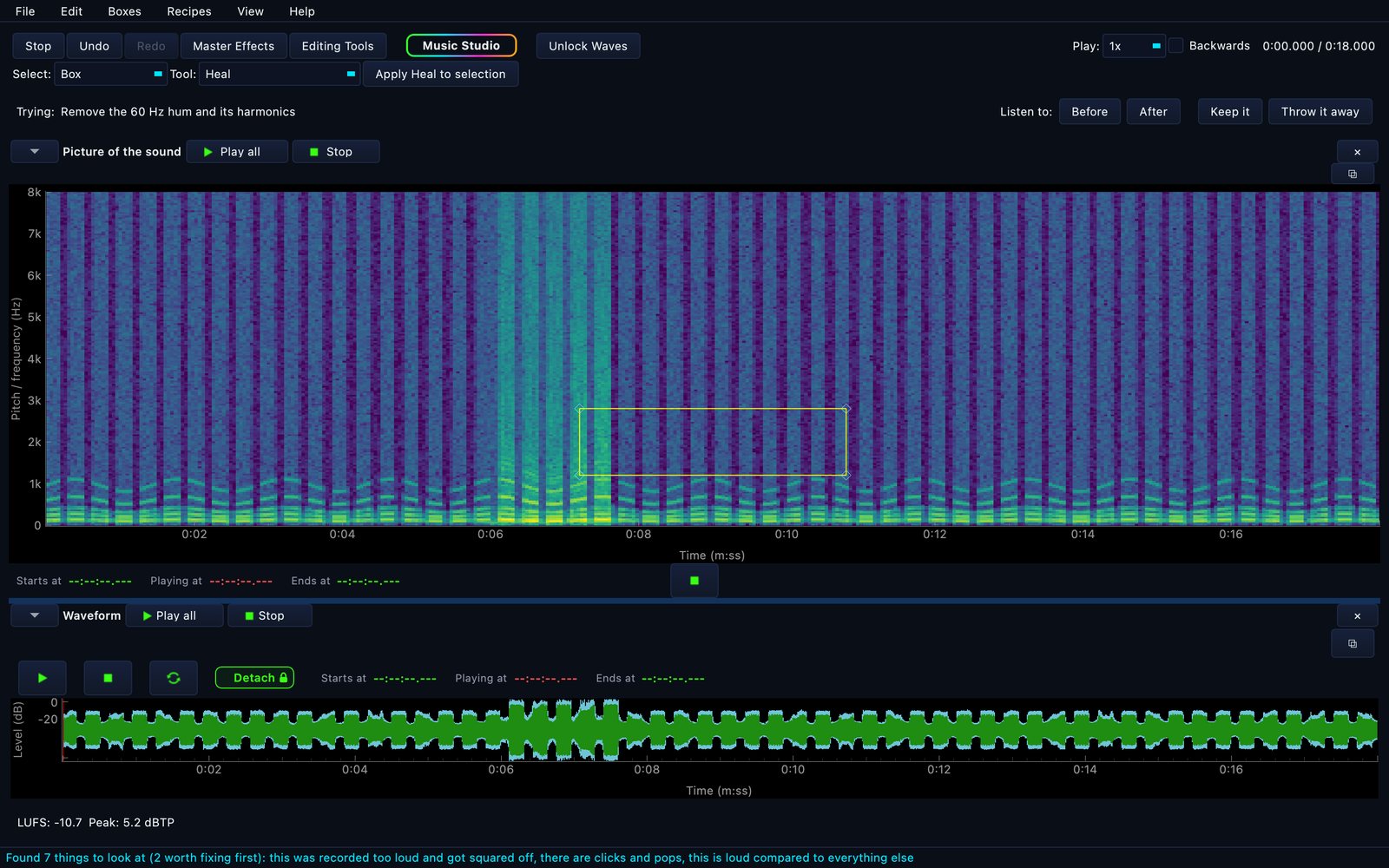
Every other editor gives you one axis: a stretch of TIME. Cut it and the
words go with it. SoundWave Studio draws your recording as a picture, so you can box the hum under
a voice — a span of time and a band of pitch — and heal only what is inside the
box. The voice stays.
On a computer, open, edit, listen and play all four Digital Instruments in
Music Studio for free, with no time limit, and your first export is free, once. After that, a
plan or a pass keeps what you make. On an iPhone or iPad, opening, editing and listening are
free, and the instruments, every export and saving a project to Files need a plan or a
pass.
Also on the Microsoft Store and the Mac App Store.
A box around the hum. Nothing outside it is touched — and you hear the fix
before you keep it.Open a recording, find the problem, box it, keep it.
Box-based editing. A box is a span of time AND a band of pitch.
Edits land only inside it. Stack boxes to catch a hum and its harmonics at once.
It tells you what is wrong. Eleven checks run over your
recording and report in plain English — a 60 Hz hum, clicks, a boomy room — with the
measurement behind each one and a button that fixes it.
Twenty-six one-click repairs. Hiss, hum, clicks, plosives,
sibilance, echo, clipping. Every one previews first, and undoes even after you keep it.
Clean a video's audio. Open an MP4, MOV, MKV or WebM, fix the
sound, and export the video rebuilt — the picture copied through untouched.
Live master effects. A 100-band equaliser, plus bass, pitch,
speed, echo and stereo focus — moving while you listen, with presets.
An assistant can drive it. MirrorEdge AI: Studio is also an MCP server with 17
tools, so Claude can open a recording, look at the spectrogram, box a noise and repair
it — through the same code and the same undo history your mouse uses.
Plain English throughout. Every control is named for what it
does to your sound, not for its parameter. A test refuses to ship a knob without a
sentence explaining it.
Your audio stays on your computer, iPhone or iPad. No account
needed, no ads, no uploads. On a computer, the app goes online for your licence and
purchases, for the optional email-code sign-in on Windows that keeps your personal
collection, and to fetch a file you asked it to open by link. On an iPhone or iPad, it
goes online only to the App Store, for prices and purchases.
Pricing
The buy buttons on this page unlock the Windows app, whether you
installed it from here or from the Microsoft Store. On a Mac, buy inside the app from the
Mac App Store: a purchase made on this page cannot unlock the Mac app.
MirrorEdge AI: Studio is free to use — open, edit, listen, preview and undo, with
no time limit and nothing watermarked. On a computer, your first export is free, once. After
that, a plan or a pass covers keeping what you make: exporting audio and video, lifting
a selection out as its own file, and saving a Music Studio mix. On an iPhone or iPad there is no
free export: every export, saving a project to Files and playing the four Digital Instruments
need a plan or a pass, bought in the app.
$12.99 a month or $99 a year for everything, or a one-time pass from $4.99.
Everything means SoundWave Studio, Music Studio with all four Digital Instruments, and
Photo Studio and Video Studio as each launches.
Founding price: join before the Video Studio launches and it never goes up while you stay subscribed.
Only need one recording? A one-time pass keeps everything:
Keep this recording is $4.99 for 48 hours, and Studio Week Pass is $8.49 for
seven days, each counted from purchase; outside the United States, the App Store shows its
own local price. Choose it in the app: on a computer, in the Unlock Studio window; on an iPhone
or iPad, in the Studio shop (tap Shop in the editor). A pass ends on its own and never
renews.
Teams: Studio Team, $49 a month for five people.
Buy Studio Team
How your licence works: a plan bought on this page unlocks the Windows app, and it is
registered to the email address you check out with. In the app, choose
Help ▸ Unlock Studio…, type that address and press Activate, adding your order number
if it asks for one. The app saves a signed licence on your computer and goes online for it
again only to re-check a subscription near or after its renewal date. On a Mac, buy inside
the app from the Mac App Store instead: Apple handles it, and Restore purchases brings it
back on any Mac. Stuck? Support.